Shipping the Verifieddit browser extension taught me that the cryptography was never the hard part. The hard part was designing for the person who has never heard of a certificate chain.
In 1999, Alma Whitten and J. D. Tygar sat users down with PGP 5.0, a security program with a polished interface, and gave them ninety minutes to sign and encrypt a single email. Most failed. The software worked. The users could not. The protection therefore protected nobody who could not operate it.
I had come across that paper somewhere not long ago, probably on Hacker News. Then I shipped Verifieddit for Chrome, an open-source browser extension that inspects C2PA Content Credentials in photos, videos, audio files, and PDFs. The same tool is available as the Verifieddit add-on for Firefox. It can report who signed an asset, what provenance information is attached to it, and whether the file has changed since.
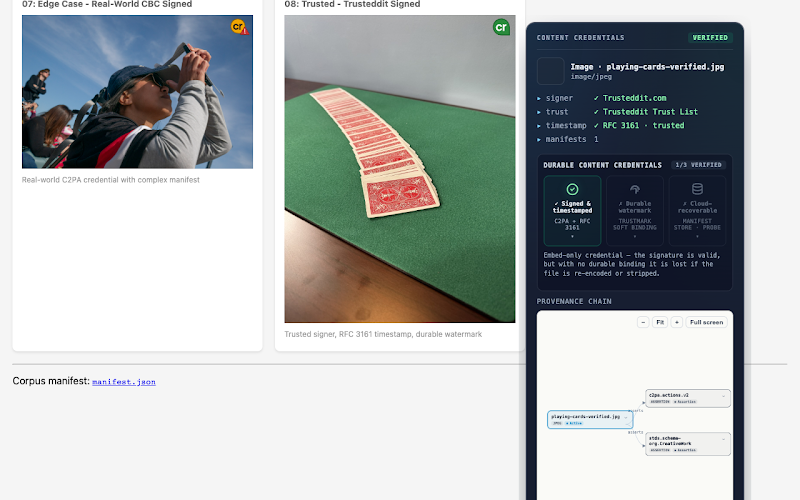
The cryptography worked on day one. Everything else had to be learned the hard way.
That turned out to be the important part.
Verifieddit is not really for the engineers who built it. Think about a picture editor with a wire photo and eleven minutes to decide what to do with it. Think about a teacher checking an image before showing it to a class, or anyone who has already circulated a fake and wants a better way to check the next one.
None of them need to know what an RFC 3161 timestamp is. They need to know whether the tool is working and what the result means.
That was not obvious in my first version.
For a while, selecting “verify” on an image produced nothing on many news sites: no badge, no message, no error. The result was indistinguishable from the extension not being installed. A technical user might open a console and investigate. Almost everyone else would assume the thing was broken and uninstall it.
They would have been right to.
Silence was the first mistake. Noise was the second.
When automatic scanning went live, any image larger than five pixels square without a credential received an icon overlay: a grey camera stamped with a red slash. On today’s web, that meant nearly every picture on the page. Who wants an extension that tells you “nothing to report” a hundred times per article?
Then came a subtler problem: verdicts that were technically correct but humanly misleading.
A photograph exported from Photoshop, Lightroom, or Firefly could show up as signed but untrusted because my bundled trust information did not yet recognise the relevant certificate chain. That result was not wrong in a narrow cryptographic sense. But to an ordinary user, “untrusted” sounded like “suspicious.”
Security software lives or dies in that gap between the technically precise interpretation and the one a person reasonably takes away.
Getting that right meant treating plain language as part of the security model.
An earlier panel included a row labelled “AI detection” and displayed “no” whenever generative markers were absent. That was factually tempting and practically misleading. Verifieddit does not analyse pixels and never did; it reads what a signer declares in a Content Credential.
The row now says “AI (declared by signer).” When nothing is declared, it says “not declared.”
That distinction matters. An absent declaration does not prove human authorship. A credential can provide evidence about provenance and integrity; it cannot, by itself, tell you whether the scene depicted is true or whether the person who signed it is trustworthy.
The same principle applies to failures. A file blocked by a network problem no longer gets a confident-looking negative result. It says “Unchecked.”
Those changes required only a handful of strings. They changed the meaning of the product.
The other lesson was that users should not have to make cryptographic decisions before they can use a cryptographic tool.
Verifieddit now ships with the trust information it needs to recognise supported cameras and editing tools out of the box. There is no account to register and nothing to configure.
Background scanning is disabled by default. So is the optional online durability check. Verification itself runs locally in the browser, so the media being inspected does not need to leave the machine.
That is another lesson from security usability: every setting you ask an ordinary person to understand is a setting they may get wrong.
The goal is not to hide complexity. It is to put complexity where it belongs.
When you encounter an image, the useful question should not be “Do I understand certificate chains?” It should be “Is there provenance information here, and what does it say?”
A small badge in the corner of the image should be enough to get you started. Click it and the extension should explain what it found in language a non-specialist can understand.
I have long argued that cryptographic provenance, rather than polite social norms, is our best defence against AI-driven social manipulation. Building Verifieddit exposed the perimeter of that belief.
The mathematics can be sound. The standard can be sound. The implementation can be open source and carefully engineered. None of that matters much if the final metre, where a human being evaluates an image, is designed only for the specialists who drafted the specification.
That was the warning in 1999, and it remains the warning now.
Security software has to work for the people who did not build it.
If verification is going to become an ordinary part of life on the web, it cannot require ordinary people to become security engineers first.
The next time an image makes you wonder where it came from, that is the problem Verifieddit is designed to help you investigate.
Install Verifieddit for Chrome · Install Verifieddit for Firefox